
Case Studies by Field
All Case Studies31
Cloud Services9
Core & Business Systems4
Construction DX2
E-commerce Development3
Inventory & Order Management4
AI Adoption11
DX Promotion8
New Ventures12
CASE STUDY
AI Takes Change Requests from Specification to Production: Running the AI Agent Mr.AI In-House
Introduction
Our business tool, projectAI, has the AI agent "Mr.AI" built in. Mr.AI does more than answer questions. It takes the change requests we receive from clients and carries them forward on its own: investigating the cause, writing the specification, implementation, testing, and deployment to the production environment.
This case study focuses on Mr.AI rather than projectAI as a whole, and covers three points.
- What Mr.AI carries forward automatically, and how far
- Where people make decisions, and what is not delegated to AI
- What we have learned from running it since July 2026
projectAI's AI features as a whole, and how it handles data and costs, are covered in our case study on running projectAI company-wide.
The Problem We Wanted to Solve: AI That Only Answered Did Not Move the Work Forward
In contract development, change requests keep coming from clients even after a system has launched. "We want to add this field." "This screen shows an error." Each request may be small, but the process for handling it is the same every time.
Understand the request → investigate the cause → write it up as a specification and confirm with the client → implement → test → have the client check it → deploy to the production environment → report
Much of this process is not judgment but the work of "carrying." And between one step and the next, there is always waiting. Waiting for the person in charge to be free. Waiting for the client to check. Waiting out the time difference between Tokyo and Kathmandu. The more requests there are, the more the waiting piles up.
When Mr.AI went live in July 2026, it started with the role of answering questions based on project records. It could search the records and answer, but the change requests themselves still had to be carried from step to step by people. So we decided to give Mr.AI the role not just of "answering" but of "moving work forward."
What Mr.AI Handles
Mr.AI's work falls into two broad roles: "answering" and "moving work forward."
Answering: Responding Based on Project Records
| Where it is used | Who uses it | What it does |
|---|---|---|
| Internal assistant | Employees | Answers across the records of all projects |
| "@Mr.AI" in chat | Employees and clients | Answers within a thread, based on that project's records |
| Client assistant | Clients | Answers using only the information the client is allowed to see (enabled per project; off by default) |
| Internal chat bot | Employees | Answers inside the internal chat tool people already use |
| Memory consolidation | (Automatic) | Every day, summarizes recent chat sorting results and corrections from the people in charge, for use in the next round of sorting |
When answering, it relies only on the data it has read on the spot. It checks its draft answer against the data it read and the list of members, and removes any names or numbers without a basis before replying.
Moving Work Forward: Change Requests from Specification to Production
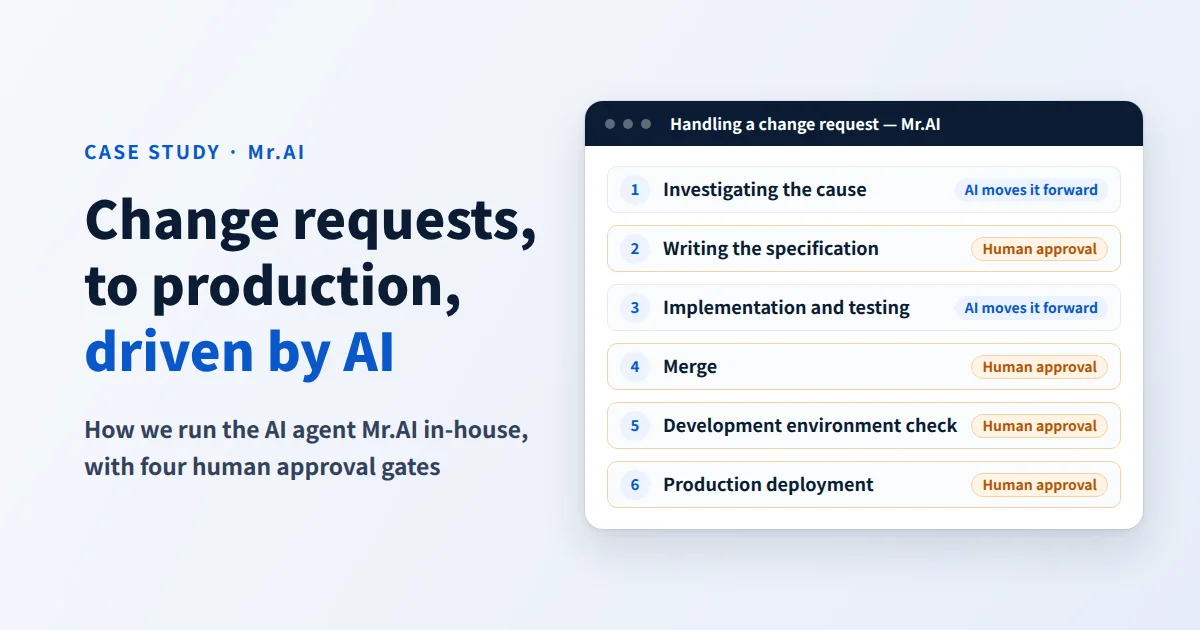
When a change request is registered, Mr.AI moves the work forward in the following order. The person markers in the diagram show the gates where people give approval.

- Investigating the cause (for bugs): It examines the program and posts its assessment of the cause in the request's thread. When it cannot narrow the cause down, it asks the client questions.
- Writing the specification: It sets out what to change and how, the acceptance criteria, and the estimated effort. It asks about unclear points as numbered questions.
- Implementation and automated testing: It changes the program according to the specification and runs the automated tests. If they fail, it fixes the problem and runs them again.
- Merge: It merges the change that passed the tests into the main code.
- Checking in the development environment: It deploys to the development environment and asks for a check, with the verification steps attached.
- Deployment to the production environment: It deploys to production, confirms that the deployment succeeded, and then reports completion.
Throughout, a monitoring system checks every 10 minutes for stalled work (described below).
It went live in late July 2026, and from mid-August to early October, at least 21 changes made by Mr.AI were merged into the production source code of our products. This is a lower bound, counted from the source code management history by the fixed label attached to Mr.AI's changes.
Separating What People Decide
The AI Is Not the One Who Decides
The first thing we decided in designing Mr.AI was this: "Do not let the AI decide whether to move to the next step."
Whether to move to the next step is decided not by the AI's self-report of "done" but by results outside the AI. Whether the tests passed is judged by the testing system. Whether the specification is right, whether a change can be merged, and whether it can go to production are judged by people. Operations such as advancing a step, merging and deploying are performed only by programs that follow fixed procedures.
Four Gates Where People Approve
| Gate | Main decision-maker | Material for the decision | If not approved |
|---|---|---|---|
| Specification | Client | Summary of the specification, acceptance criteria, estimated effort | A request for changes means it is redone; a rejection closes the request |
| Merge | Our person in charge | The content of the change, and the version that passed the tests | Returns to the fixing work |
| Check in the development environment | Client | Verification steps and the actual screens | Fixed and resubmitted; after more than two rounds, the person in charge takes over |
| Deployment to the production environment | Client and our company | The changes to be deployed | Stopped, and the person in charge takes over |
Approvals follow rules that prevent mix-ups.
- If the content changes after approval, the approval has to be given again
- Approvals given for an old version are ignored
- When both an approval and a send-back are given, the send-back takes priority. Sending back requires entering a reason
- Who decided what, and when, is all kept on record
Approvals have no deadline. Even if time passes with no reply, the AI never moves ahead on its own judgment.
Choosing How Much to Delegate from Six Levels per Project
How much to delegate to the AI can be chosen for each project.
- Up to investigating the cause
- Up to writing the specification
- Up to creating the change
- Up to deployment to the development environment
- Up to deployment to the production environment (a person approves at each gate)
- Fully automatic
If fully automatic is chosen, approvals at the gates are skipped, and the work proceeds with a record saying "approved automatically." Even so, the following safeguards stay in place.
- Work does not start until a person sets the request to "In progress"
- There is a limit on how much can be changed at once
- Nothing is merged unless it passes all automated tests
- There is a limit on the number of fix retries
- Work is marked complete only after the deployment to production is confirmed to have succeeded
- There is a switch that can stop it at any time
What the AI Is Not Given
- Price and effort information: Features that handle prices or effort are not given to Mr.AI.
- Information beyond the client's scope: The client assistant uses only information that is set to "show to client" on that project. Quality and cost information is not shown to clients by default. Questions outside the scope are declined with a fixed message.
- Contacting people on its own judgment: Mr.AI never sends notifications to people on its own judgment. Notifications go out only in predefined situations, such as requests for approval and alerts about stalled work.
- Automatic investigation on highly confidential projects: On highly confidential projects, our practice is not to enable automatic root-cause investigation. For projects whose code cannot leave the company, we offer the option of implementing with AI that runs in our own managed environment (our in-house local LLM case study).
What We Learned from Running It
AI Stalls Before It Fails
What we learned soon after we started running it was that the AI's work "stalls" before it "gets things wrong." It keeps waiting for tests that never start. A deployment finishes but stays marked "Deploying." Work continues after a person has closed the request. None of these were about how smart the AI was; they were problems in the handoff from one step to the next.
Now a monitoring system runs every 10 minutes and compares everything against the actual state of the external systems. If waiting for test results passes 60 minutes, it notifies the person in charge; at 3 hours, it stops and hands over to a person. When a request is closed, work stops and never resumes from there.
Ask First Rather Than Proceed on Guesses
If something is unclear while writing the specification, Mr.AI does not proceed on guesses; it asks numbered questions. It asks up to three questions at a time, and when the exchange reaches three rounds, it hands over to the person in charge. The thinking is that asking first causes less rework than sending back a change built on guesses.
Waiting Does Not Disappear; It Gathers at Human Approvals
Even if the AI keeps working through the night, it waits for people at the approval gates. The faster the AI's work gets, the more the waiting gathers on the human side. So approval requests go only to the people who decide, and the material for the decision (the summary of the specification, the acceptance criteria and the verification steps) is gathered in one place to reduce the effort approval takes.
How we thought about what to delegate to AI, and how we fixed the situations that did not go well, is covered in detail in our article "What Does It Mean to Delegate Work to AI?"
Lessons for Companies Starting Out
- Start with AI that answers, then expand to AI that moves work forward. First run an AI that answers from records, and check whether your business records are sufficient as material for the AI.
- Decide the approval gates before deciding how much to delegate. At which step, who decides, and by looking at what. Once this is set, you can widen what you delegate in stages later.
- Decide in advance who takes over when work stalls. Without a monitoring system and someone to hand over to, the AI's work stops without anyone noticing.
- Move forward on results from outside the AI, not on its self-report. Advance steps on criteria outside the AI, such as test results and human approval.
- Keep a record of decisions and work. If there is a record of who decided what and what the AI did, you can also decide from those records whether to widen what you delegate.
Through our AI Implementation Support, we design this approach to fit your work. We start by running one agent in one area of your work.
Frequently Asked Questions
Could the AI change the production environment on its own? No. Deployment to production includes human approval according to the level chosen for each project. Even if you choose fully automatic, which skips approvals, work does not start until a person sets the request to "In progress," and safeguards such as passing the automated tests, the limit on the amount of change, and confirming that the deployment succeeded stay in place.
Could the AI answer with another client's information? The client assistant uses only information that is set to "show to client" on that project. The link between each user and their projects is checked twice, and questions outside that scope are not answered.
How do you check the quality of changes made by the AI? Passing the automated tests is a condition for merging, and on top of that, the client checks the actual screens in the development environment. We judge by test results and human checks, not by the AI's report that it is "done."
Can this be used for work other than change requests? Any work that follows the flow "receive, investigate, draft a proposal, have a person check it, apply it" can be designed with the same approach. The basic approach is to start by delegating investigation and drafting to AI in one area of work.
How much does it cost? It varies greatly with the scope of the work and the systems to be connected, so we prepare an estimate after consulting with you. Our process and how we think about costs are summarized on the AI Implementation Support page.
Related Case Studies and Services
- Case study: projectAI in company-wide use — 45 AI features, and how data and costs are handled
- Case study: running local LLMs in-house — Running AI without sending data outside the company
- AI Implementation Support — Running your first agent in your own work
FREE ESTIMATE
Free Estimates: Learn What to Build and the Cost Range on the First Call
Your requirements do not need to be settled. Tell us in a sentence what you want to build, and your project manager will sort it out with you.