
Case Studies by Field
All Case Studies30
Cloud Services9
Core & Business Systems4
Construction DX2
E-commerce Development3
Inventory & Order Management4
AI Adoption10
DX Promotion8
New Ventures12
CASE STUDY
How a Company Changes When AI Is Built into the Core of Its Work: Running Our In-House Tool projectAI Company-Wide
Introduction
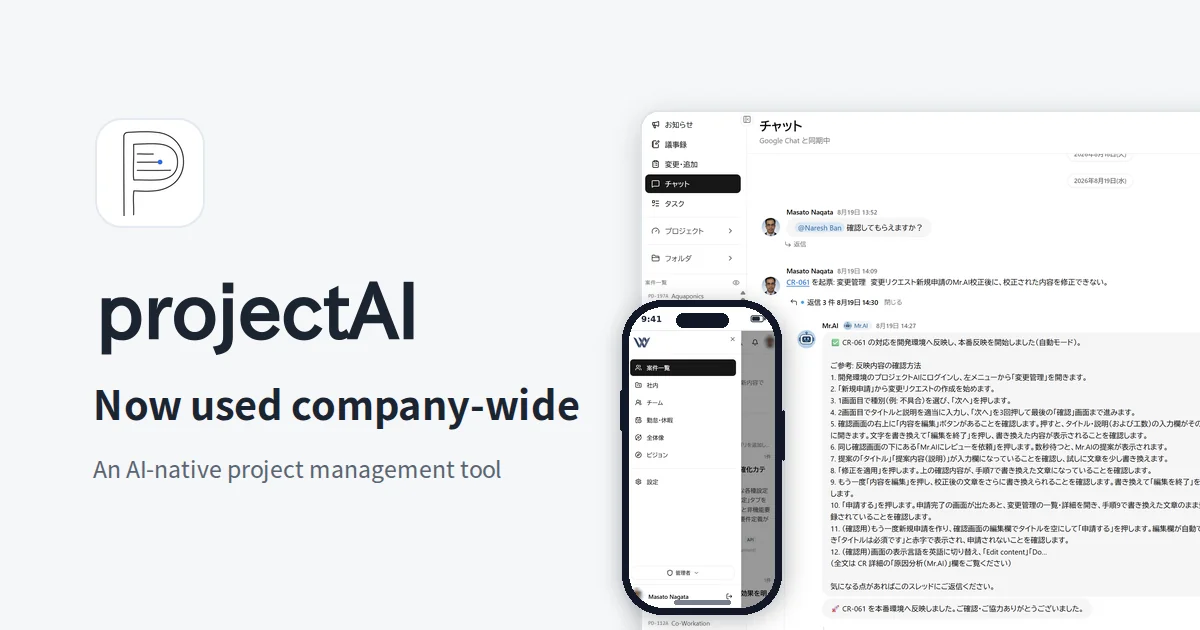
We developed projectAI in-house: a project management tool designed on the international standard for project management (ISO 21500) and the PMBOK, which manages contract development from estimate through operations on a single screen. We have been running it in production across the whole company since July 2026. There are three key points.
- 45 AI features and the AI agent "Mr.AI" work inside day-to-day tasks such as estimates, progress management, meetings, quality control, and multilingual support
- For each feature, you can choose a configuration that does not send business data to outside AI providers
- We operate it while checking, in numbers, what the AI costs and the quality of the results it produces
We also use this platform and approach as-is on client projects. We try things out in-house, refine them in-house, and then bring those methods to our clients' projects. That is the foundation of our AI implementation support, system development, and DX promotion support.
It Started from Problems Both Inside the Company and at Our Clients
It started with problems we ourselves were facing. And they were almost the same as the concerns clients often bring to us. The biggest reason was cost.
Tool costs were piling up as headcount grew. For project management we were using Slack, JIRA, Notion, and Google services side by side. For 40 employees, the license fees become a sum you cannot ignore. Every time we added people, the cost grew by the number of seats, whether or not those seats were actually used.
Even when connected, what the tools could do was limited. We had built integrations between the tools using AI and APIs, but they were complicated to manage and limited in what they could do. Whenever one tool changed its specifications, an integration would stop, and maintaining it took up our time. The integration setup itself had become one more thing to manage.
The features we wanted were missing, and there were many features we did not use. Each tool kept adding its own AI features and common features, which overlapped with one another, yet the features we really needed were nowhere to be found. For example, strictly tracking the hours spent on each project and matching estimates against actuals becomes a very complicated procedure when it spans several tools. The features most essential to managing profitability in contract development were exactly the ones outside general-purpose tools.
The data at the core of our business was accumulating inside our vendors' services. Estimates, specifications, tasks, meeting minutes, and communications were scattered in different places, and getting an overall picture meant gathering it all again by hand. Across our two locations in Japan and Nepal, language barriers and the time difference added to this and created gaps in information.
So we decided to take project management, the core of our business, back into our own hands. We wanted to be able to keep refining cost, data, and the working experience ourselves. That was the starting point for projectAI.
Where AI Works in Our Business
projectAI brings together requirements, features, tasks, quality (bugs and tests), change requests, meeting minutes, chat, costs, and sharing with clients in one place.
Within it, AI works not as one large mechanism but as a group of multiple agents with different roles. Each agent works independently in the part of the business it is responsible for, and gets on with its work without a person stepping in. The parent agent, Mr.AI, holds the memory of the whole project. The records and results each agent leaves behind gather in Mr.AI as project memory, and Mr.AI uses that context to answer questions and to pass the necessary information to the agent at the next stage. In particular, for change requests, Mr.AI carries the work through end to end: from registering the request to writing the specification, implementation, testing, checking in the development environment, and deploying to production. You can require human approval at each stage (specification, merge, and production deployment), or switch to an automatic mode that proceeds without approval.
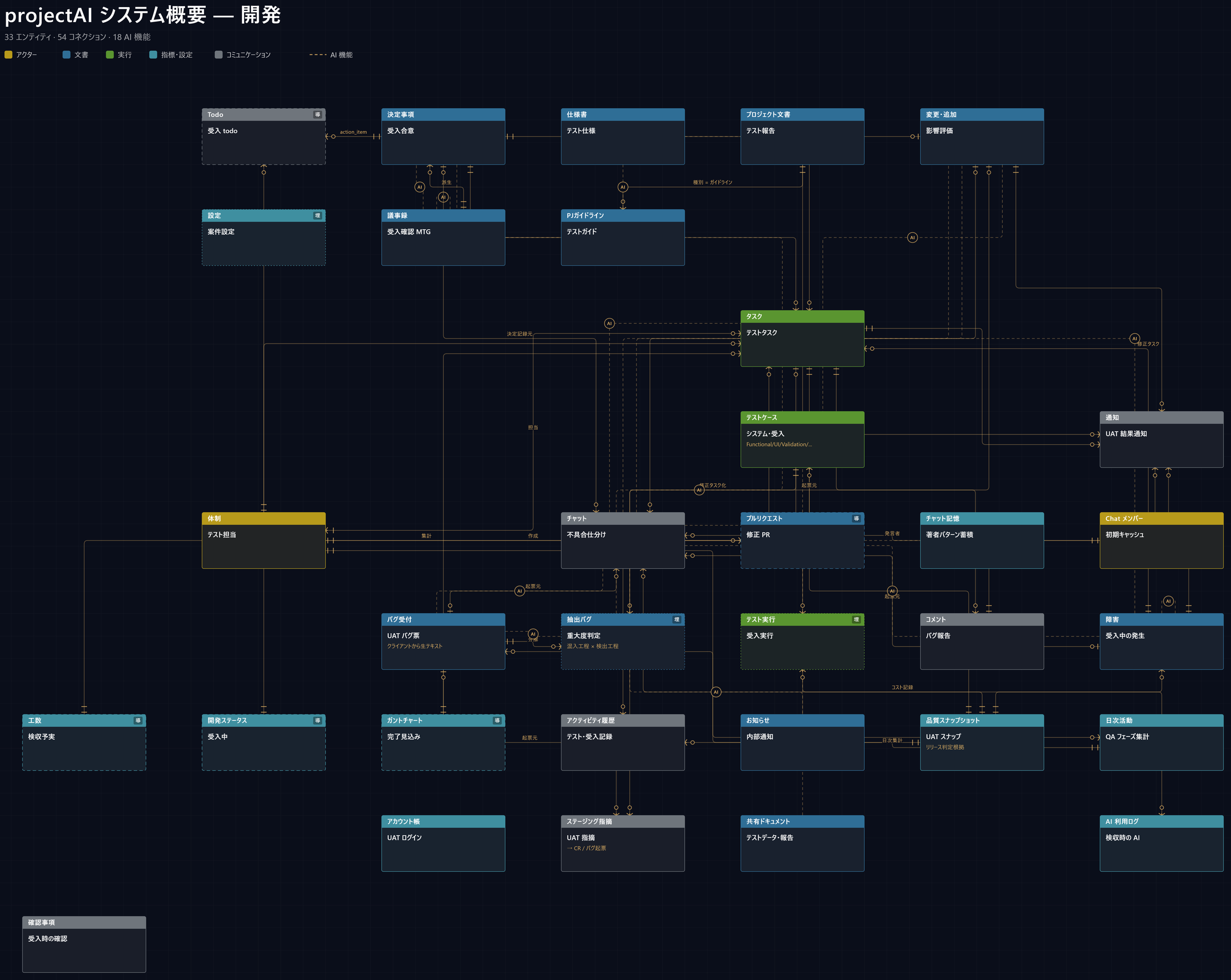
The diagram below shows the overall picture of the data projectAI handles. Elements such as projects, requirements, features, tasks, quality, change requests, meeting minutes, chat, and costs are connected by lines. This is a cross-section of the development phase: 33 elements are linked by 54 lines, and 18 AI features are at work in this phase. The dashed lines are the paths along which AI works.
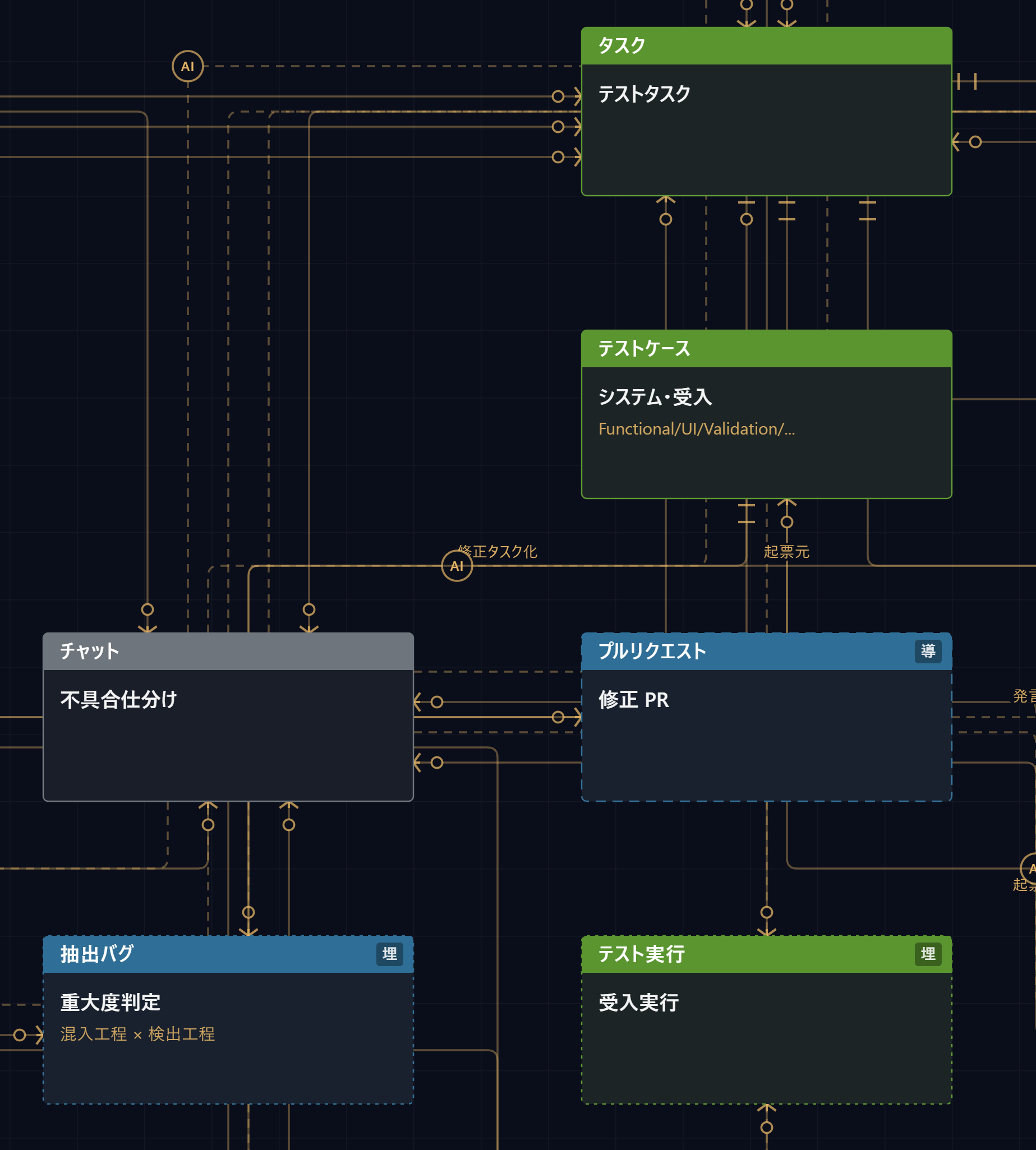
When you zoom in, you can see the "AI" markers between elements. This is where AI is at work. For example, a bug written in chat is sorted by AI and filed as a ticket, and a failed test case leads, via "turn into a fix task," to a task and a pull request.
Here is the list of AI features currently in operation (45 features).
| AI in charge | No. | AI feature | Role |
|---|---|---|---|
| Mr.AI (parent, holds the memory) | 1 | Internal assistant | Answers @mentions based on records |
| 2 | Client assistant | Answers within the scope the client can view | |
| 3 | Chatbot | Answers in internal chat | |
| 4 | Memory consolidation | Adds the key points of chat to memory every day | |
| 5 | Bug root-cause analysis | Examines the code and posts the cause | |
| Automated change request handling (Mr.AI) | 6 | Writing the specification | Writes the spec and verification steps, then waits for approval |
| 7 | Implementation | Changes the code according to the spec | |
| 8 | Automated testing | Fixes and retries on failure | |
| 9 | Merge | Merges the change after approval | |
| 10 | Checking in the development environment | Deploys and asks the person in charge to check | |
| 11 | Deployment to production | Deploys to production and reports the result | |
| 12 | Questions and answers | Asks a person when unsure | |
| 13 | Monitoring | Detects stalls, then retries and notifies | |
| Estimating and requirements AI | 14 | Feature generation | Creates a feature list from the specification |
| 15 | Task generation | Breaks features down into tasks | |
| 16 | Project summary | Summarizes the overall picture of a project | |
| Progress management AI | 17 | Milestone generation | Proposes milestones |
| 18 | Schedule planning | Drafts a schedule | |
| 19 | Dependency suggestions | Finds prerequisite tasks | |
| 20 | Due date suggestions | Proposes due dates for tasks | |
| 21 | Sprint planning | Proposes the combination of tasks for the next period | |
| 22 | Task review | Points out issues of granularity and omissions | |
| 23 | Task reference matching | Links references in text to actual tasks | |
| Meeting AI | 24 | Decision extraction | Pulls out decisions, owners, and deadlines |
| 25 | Summary of previous minutes | Summary for the start of the next meeting | |
| 26 | Summary for sharing | Summarizes for stakeholders without rewording | |
| 27 | Turning decisions into tasks | Turns what was decided into tasks | |
| 28 | Minutes translation | Aligns Japanese and English | |
| Chat AI | 29 | Message sorting | Classifies consultations, reports, and requests |
| 30 | Filing change requests | Drafts from conversations | |
| 31 | Filing tasks | Drafts from conversations | |
| 32 | Filing incidents | Detects incident reports and drafts them | |
| Quality control AI | 33 | Bug report formatting | Turns notes into reports with reproduction steps |
| 34 | Turning bugs into tasks | Turns reports into fix tasks | |
| 35 | Turning incidents into tasks | Turns incident tickets into response tasks | |
| 36 | Similar incident search | Shows similar past incidents | |
| Change request AI | 37 | Change request review | Points out gaps and the scope of impact |
| 38 | Turning change requests into tasks | Turns approved changes into tasks | |
| 39 | Change summary | Release notes in Japanese and English | |
| Multilingual AI | 40 | Automatic translation | Fills in the missing language in records |
| 41 | Content translation | Translates while preserving structure | |
| 42 | Bulk translation | Translates past records in bulk | |
| Client sharing AI | 43 | Automatic document sorting | Sorts documents by project, and hands off to a person when unsure |
| Announcement AI | 44 | Announcement generation | Turns deployed changes into text for users |
| 45 | Project update history | Creates the change history shown to clients |
What all of these features share is a division of roles: AI handles "drafting, organizing, translating, searching, and deploying," and people "decide" the direction. The agents work independently around the clock, what they did is kept on record, and at high-impact stages they wait for human approval.
How the Company Changed
The most common failure in AI adoption is "we introduced it, but nobody uses it." projectAI continues to be used across the whole company, so how has our daily work changed? There are four key points.
Neither fully automatic nor left entirely to AI. Rather than leaving everything to one large AI, we built multiple AIs with different roles into each phase: estimates, progress management, meetings, quality, change requests, translation, and announcements. AI never tires, misses nothing, and processes a wide range at once. On top of that, we always put the judgment of the person in charge at the key points: approving specifications, merging changes, deploying to production, and deciding priorities and effort. AI widens the options, and the person in charge narrows them down with judgment. For each feature, we keep to the order of "AI expands, people compress."
Four tools became one screen. Project management that had been split across Slack, JIRA, Notion, and Google was brought together in one place, and per-person license fees are no longer needed. The AI usage fees that took their place are costs visible in yen, by feature and by project. We no longer pay for "seats nobody uses." There is no need to learn a new tool either. Write meeting minutes and the decisions are extracted; write a question in chat and a draft ticket is created; register a task and an English version is prepared. AI works inside the usual flow. When you want to ask something, you just address Mr.AI with "@" in chat.
It keeps running without stopping, and waiting time has disappeared. Many of the agents run around the clock without anyone giving instructions. By morning, translations are complete, announcements have been written, an assessment of the cause behind a change request has arrived, and in automatic mode, the change has already been deployed to production. Because work does not wait for the time when a person "uses" AI, it never stalls. Tokyo and Kathmandu can now see the same screen in the same language, and the time difference is no longer a constraint. We can still entrust this work with confidence because everything the AI did is kept on record and the design lets us put human approval in place at high-impact stages. The client assistant can be enabled or disabled for each client.
Our relationship with clients changed from reporting to sharing. On a dedicated client portal, clients can see progress, deliverables, communications, and change history as they are. Instead of preparing regular report documents, we can talk while looking at the same thing at any time. For change requests, progress from registration to production deployment is visible, so there is no longer any need to ask, "Where does this stand now?"
Your Data Does Not Have to Leave
One concern always comes up in AI adoption consultations: "Is it all right to hand business data to an outside AI?" In projectAI, we answer this question through configuration.
- For each AI feature, you can choose whether to use cloud AI or a local LLM that we run ourselves. A switch takes effect across the whole system in about 30 seconds, with no need to stop the system
- Our in-house AI processing units only go out to fetch work; they have no entry point from the outside
- Whenever processing could not be done locally and was switched to the cloud, a record is kept every time, along with the reason
In other words, you can choose a configuration that does not send data to third-party AI providers, starting from the features that need it. The location of the data is limited to our own contracted cloud environment and our own equipment. There is no need to make everything local from the start; in practice, the advantage is that you can move things over step by step according to how sensitive the information is.
AI Costs Are Predictable, and Quality Is Measurable
We often hear, "We introduced AI, and all we were left with was the monthly fee." In projectAI, we made AI cost and quality measurable from the start.
- AI usage costs are visible in yen, by feature and by project. Processing done by the local LLM is recorded as zero cost, and the ratio of cloud to local is clear at a glance
- For a feature we newly want to hand over to the local LLM, we first run it in parallel with cloud AI on the same input, and a person compares the two results and makes the call. Based on that tally, we switch over the features we judge can be entrusted
- AI errors are stopped by design. There are three layers: output is allowed only in a fixed format, output is checked against the actual data and anything that does not exist is discarded, and questionable output is logged so it can be traced later
We do not let the effect of AI end at "somehow convenient"; we expand the scope of operation while measuring cost and quality. This way of operating is itself the AI adoption approach we recommend to our clients.
How It Works on Your Project
projectAI is not just an internal tool for us. Client projects run on the same platform, and clients can check progress, deliverables, and communications at any time from a dedicated client portal. Tasks, issues, and decisions are extracted automatically from meeting minutes and chat, so "he said, she said" disputes and gaps in the record are less likely. Because the same screen can be viewed in Japanese and English, information stays aligned even in teams with overseas offices or members of other nationalities.
If you are considering AI adoption, we proceed in the following order.
- Analysis of your current operations and challenges
- A working AI demo, where you see the mechanisms introduced in this case study on actual screens
- Running your first agent in your own business
- Moving to production operation while measuring the effect
- Adding more people who can use it well and more agents, and moving toward in-house development
The process and pricing structure are summarized on the AI Implementation Support page.
Development Speed and Scale in Numbers
All of the following are actual figures measured from projectAI's source code management history (March 3 to August 24, 2026; about six months, or 25 weeks).
Volume and speed of change
- Merged pull requests: 993 (about 40 per week)
- Commits: 2,657 (about 106 per week; 742 in the busiest month)
- Lines added: about 440,000; lines deleted: about 110,000 (excluding library definition files and the like)
- Current source code: about 320,000 lines, in over 1,500 files
Quality and operations
- Releases: 51 (in about six months, an average of twice a week)
- 45 AI features, three interfaces for administrators, developers, and clients, and eight phases from estimate to operations, all brought together in one product
How fast is this?
- About 40 pull requests per week is a pace of roughly 8 changes passing review and being merged every business day.
- Releasing twice a week exceeds the band of average teams, defined as "once a week to once a month" in the software delivery performance research (DORA), and is close to the top band, defined as "daily or on demand." And this has continued without a break for six months.
- Writing about 320,000 lines of source code in six months is, measured against the common benchmark for one developer's output including maintenance and design (a few hundred to around fifteen hundred lines a month), a scale that would normally take years.
- A business system covering estimates, specifications, tasks, quality, change requests, meeting minutes, chat, costs, and a client portal is normally the scale a dedicated team takes years to build. We built it in half a year, and in a state ready to use on all of our own projects.
The most important number is that we deleted about 110,000 lines. We ourselves removed an amount equal to a quarter of the lines we added. We do not stop once something is built; we use it every day and run the PDCA cycle, removing features that went unused and rebuilding specifications that no longer matched reality. It is because of this repetition that, in half a year, it became something "that stands up to the work of the whole company." We place as much importance on fixing fast and discarding fast as on building fast.
This speed is the result of a development process built on the assumption of AI coding agents. Every change is linked to a task, and changes that are not linked are stopped by the system. Separating human judgment from AI execution is the same in development work, too.
If You Face Challenges Like These
- You want AI to take root in your business, starting with one task → AI Implementation Support
- You want to build business systems or SaaS with AI built in → System Development
- You want to drive DX across your organization in a way you can run yourselves → DX Promotion Support
Questions We Often Hear Before a Consultation
Is this about buying this tool? No. projectAI is our own business platform, and it is not for sale. What we want to convey in this case study is an approach: "build AI into the core of your business, make it take root, and expand it while measuring cost and quality." We will take on your challenges with the same approach.
Will the AI learn from our data? It is not used for training. AI is used only for processing on the spot, and you can also choose where that processing happens (in the cloud or on your own equipment).
Can a small company, or a single department, get started? Yes. The basic approach is to run your first agent in one task, confirm the effect, and then expand.
Does it connect with our existing business systems? Yes. Rather than having you learn a new tool, we design it so that AI is built into the business workflow you use now.
How do you measure the effect? From the start, we build in mechanisms that make AI costs visible by project and by feature, and that have people judge the quality of AI output.
What Comes Next
While rolling it out as standard on client projects, we will continue bringing local LLMs and AI agents in-house. We will feed the knowledge proven in our own work directly back into our clients' projects.
Why did we build this ourselves? What have we seen in project management? The background is written in our CEO's own words here.
Related news: Announcing projectAI, our in-house AI-native project management tool, now in company-wide operation
SERVICES
Services Related to This Case Study
FREE ESTIMATE
Free Estimates: Learn What to Build and the Cost Range on the First Call
Your requirements do not need to be settled. Tell us in a sentence what you want to build, and your project manager will sort it out with you.