
Case Studies by Field
All Case Studies31
Cloud Services9
Core & Business Systems4
Construction DX2
E-commerce Development3
Inventory & Order Management4
AI Adoption11
DX Promotion8
New Ventures12
CASE STUDY
Running AI Without Data Leaving the Company: How We Choose Cloud AI or a Local LLM Feature by Feature
Introduction
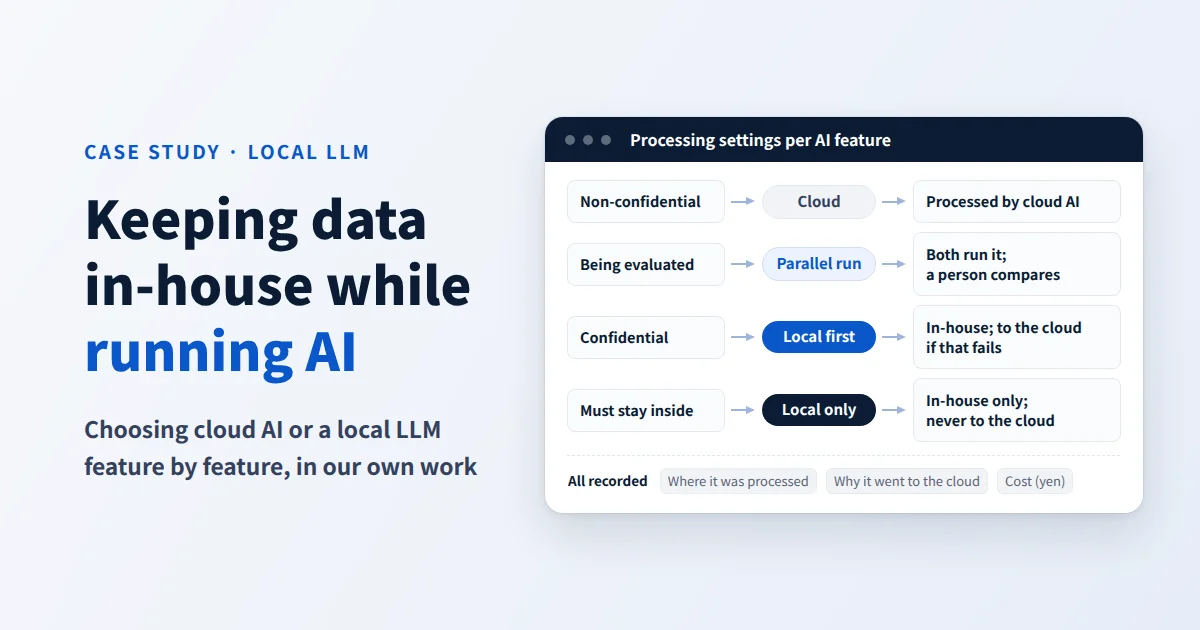
We run the AI features of our business tool, projectAI, by routing each feature either to "cloud AI" or to "a local LLM running in an environment we manage ourselves." This case study covers how we built the system, how we choose between the two, and what we learned from running it. There are three key points.
- Where processing happens can be chosen for each AI feature, and a switch takes effect across the whole system in about 30 seconds
- Before handing a feature to local, we run it in parallel with the cloud on the same input, and a person compares the results and makes the call
- For each feature, we decide whether processing that could not be done locally goes to the cloud or stops and goes to a person, and everything is recorded
In this case study, "an environment we manage ourselves" means our own equipment and the cloud environments we contract for and manage. "Local LLM" refers to the AI running inside them. We use these terms in the sense of not sending data to third-party AI vendors.
projectAI's AI features as a whole are covered in our case study on running projectAI company-wide, and our support for building local LLMs in your environment on the Local LLM Build and Implementation Support page.
Why We Needed to Run AI in an Environment We Manage Ourselves
What the AI Reads Is Information Entrusted to Us by Clients
In projectAI, AI does its work by reading chats with clients, meeting minutes, incident reports, documents entrusted to us by clients, specifications and tasks. All of it is information our clients have entrusted to us.
Many cloud AI services for businesses offer contracts under which input is not used for training. We are not avoiding cloud AI because it is dangerous. But information that contracts with clients or internal rules say must "not be sent to outside AI vendors" cannot be given to cloud AI, however convenient that would be. In work that handled such information, we had no choice but to give up on using AI at all.
This concern is not ours alone. In the Ministry of Internal Affairs and Communications' 2026 White Paper on Information and Communications in Japan, "security risks such as leaks of internal information" was the most commonly cited risk that Japanese companies are concerned about in using generative AI, at 46.4%. In AI adoption consultations too, the question "Is it all right to hand business data to an outside AI?" always comes up.
We Cannot Propose What We Do Not Run Ourselves
The other reason is our responsibility for what we propose. If we tell clients "We can also build a setup that keeps your data inside the company," we need to use that setup ourselves every day and know both its strengths and its difficulties. So we decided to start by using a local LLM for real production work in our own business tool.
How We Built It: Three Components
The system is made up of three parts: the routing settings, the in-house processing unit, and a record of every request.

1. Per-Feature Routing Settings
For each AI feature, we choose one of the following four processing methods.
| Setting | Where it is processed | When it is used |
|---|---|---|
| Cloud | Cloud AI | Processing without confidential data. Newly added features start with this setting |
| Parallel run | Cloud AI returns the response, while the same input is also processed locally and the results are compared | Features being considered for migration to local |
| Local first | Local. Sent to the cloud only when it cannot be processed locally, with the reason recorded | Features we have decided to migrate |
| Local only | Local only. Not sent to the cloud even when it cannot be processed | Features that handle information that cannot be given to the cloud |
Only administrators can change the settings, and a history of changes is kept. A change takes effect across the whole system in about 30 seconds, with no need to stop the system. There is also a switch that sends everything back to the cloud at once.
2. An In-House Processing Unit with No Entry Point from Outside
The in-house processing unit does not wait to be called from outside; it goes out and fetches work itself.
The business tool simply places requests to be processed locally in a queue. The in-house processing unit connects outward, picks up requests from the queue, processes them and writes the results back. We have built no entry point through which anything can come into the processing unit from outside.
The processing unit regularly sends a signal that it is "running." If the signal stops, or processing does not finish in time, the request is either sent to the cloud or stopped without going to the cloud, according to each feature's setting.
3. A Record of Every Request
Every time AI is called, we record where it was processed, whether it was sent to the cloud and why, the cost, and which project it was for. On the admin screen, you can check how many requests were recently sent to the cloud.
Costs are shown in yen for each feature. Requests processed locally are recorded as ¥0, because they incur no pay-per-call charges. Hardware, electricity and maintenance still cost money, however. We consider these fixed costs separately from the records.
How We Choose Between Cloud AI and Our Own Managed Environment, Feature by Feature
Four Criteria
1. How sensitive the information given to the AI is. This is the most important criterion. We divide the information AI reads into three levels, and our policy is to move the most sensitive to local first.
| Sensitivity | Examples of information the AI reads | Policy |
|---|---|---|
| Highest | Chats with clients, meeting minutes, incident reports, entrusted documents | Move to local as a priority |
| High | Specifications, tasks | Move in turn while checking quality |
| Low | Supplementary information attached to work records | Can stay in the cloud |
2. The size of the input and the length of the output. Processing that reads long documents in one go, or writes long text, takes time locally. We have put these features later in the migration order.
3. How easy it is to check quality, and the impact of mistakes. The first thing we moved was translation. Its quality is easy to check by comparing it with the original, and mistakes are easy to fix.
4. Whether it may be sent to the cloud when it cannot be processed locally. Features that may be sent are set to "Local first," and features that must not be sent are set to "Local only." The more trouble a stoppage would cause, the more a feature leans toward "Local first"; the more it handles information that cannot leave the company, the more it leans toward "Local only."
How We Divide the Work Today
- Processed locally: translation, and linking task references in text to the actual tasks
- Compared in parallel runs: extracting decisions from meeting minutes
- Split by use: Of the work in which the AI agent "Mr.AI" fixes programs, we offer the option of fixing small bugs locally on projects whose code cannot leave the company. In our comparison, small fixes reached the same results as the cloud, while fixes spanning multiple features showed a tendency to skip tests, so adding features stays in the cloud
The division does not run in one direction only. We have also started using the reverse switch, processing locally when cloud AI is unavailable because of an outage. Local is not a replacement for the cloud; each serves as a backup for the other.
Verify with a Parallel Run, Then Hand It Over
Whether to hand a feature to local is decided by the results of a parallel run. The same input is processed by both the cloud and local, and the two outputs are saved as a pair (deleted automatically after 7 days). The two are shown side by side on the admin screen, a person rates them "OK locally," "Equivalent" or "Worse," and the ratings are tallied for each feature. Cases where local produced no answer are counted separately, so that failures are not buried in the totals.
According to the white paper mentioned above, 29.1% of Japanese companies carry out regular evaluation and verification after introducing generative AI. Not only with local LLMs, the quality of AI cannot be known without "a way to measure it after it is introduced." The parallel run builds that measurement into daily operations.
What Worked Well and What Was Hard in Practice
What Worked Well
- You do not have to move everything at once. Because switching happens per feature, without stopping anything, in about 30 seconds, you can move things a little at a time while checking. If something does not work, you can switch it back with the same effort.
- The records let you notice problems. Because the number of requests sent to the cloud and the reasons are kept, the assumption "we thought it was being processed locally" can be checked against the records.
- You can see what the costs consist of. Because pay-per-use charges are visible in yen for each feature, you can decide which features to move to local based on both sensitivity and cost.
- It gives you a way out during cloud outages. Having both local and cloud has made it easier to keep working when either one goes down.
What Was Hard
- Designing time limits for long processing is hard. Translating long documents sometimes went over the time limit. And because a request goes to the cloud when the local wait exceeds the limit, there were times when it was processed by both and we paid twice. We are reviewing the time limit and the amount passed at once for each feature.
- Requests were going to the cloud without our noticing. In one case, a list passed in one go exceeded the size limit, and it kept being processed in the cloud instead of locally. We noticed because it was in the records, but without the habit of checking the records, we would surely have missed it.
- New features tend to slip outside the routing. As we added features, processing that bypassed the routing system sometimes crept in. Every time we add a new feature, we check that it is covered by the routing.
- Keeping internal information out of view. Internal information about where a request was processed was once shown on client screens, and we fixed it so it appears only on internal screens.
- Owning hardware makes operations your job too. Stoppages, updates and monitoring of the processing unit are our job. We can keep it going because there is a system that automatically sends work to the cloud, or to a person, when it stops.
Lessons for Companies Starting Out
- You do not have to make everything local. Take stock of the information given to AI by sensitivity, and move the most sensitive features first.
- Compare in a parallel run before moving. People make the judgment. Based on the results, switch over the features that are ready to hand over first.
- Decide in advance what happens when processing cannot be done locally. May it go to the cloud, or should it stop and go to a person? Decide this for each feature.
- Record where every request was processed, and why. Without records, you cannot confirm that data really is being processed in-house.
- Decide who runs the hardware. Only once you have decided what happens during stoppages and updates is it ready for business use.
Through our Local LLM Build and Implementation Support, we design this approach to fit your work and how you handle information. You can start with a single feature.
Frequently Asked Questions
Is a local LLM less accurate than cloud AI? It depends on the feature. We could hand over processing with fixed-format output and processing with short input, while long documents and judgments spanning multiple features stay in the cloud. That is exactly why we verify in a parallel run before switching.
Does no data at all leave the company? Processing for features set to "Local only" is never sent to third-party AI vendors. Features set to "Local first" may be sent to the cloud when they cannot be processed locally, and in that case the reason is recorded. Which setting to use is decided for each feature.
Is a local LLM free of cost? There are no pay-per-call charges, but hardware, electricity and maintenance cost money. How we think about costs is summarized on the Local LLM Build and Implementation Support page.
Is it better not to use cloud AI? No. We keep using cloud AI ourselves. For processing without confidential data, or processing that handles long documents, the cloud is often the better fit, and local and cloud also serve as backups for each other. What matters is choosing between them feature by feature.
Can a small company, or a single department, get started? Yes. The basic approach is to start with one highly sensitive feature, checking it in a parallel run as you go.
Related Case Studies and Services
- Local LLM Build and Implementation Support — Using generative AI without confidential data leaving the company
- Case study: running the AI agent Mr.AI in-house — Taking change requests from specification to production
- Case study: projectAI in company-wide use — 45 AI features, and how data and costs are handled
- AI Implementation Support
Source: Ministry of Internal Affairs and Communications, "2026 White Paper on Information and Communications in Japan: Risks of Concern and the Status of Efforts to Address Them" (in Japanese), Figure I-2-1-8 "Risks of concern in using generative AI (by country)" and Figure I-2-1-9 "Status of efforts to address risks (by country, and by company size in Japan)"
FREE ESTIMATE
Free Estimates: Learn What to Build and the Cost Range on the First Call
Your requirements do not need to be settled. Tell us in a sentence what you want to build, and your project manager will sort it out with you.