
BLOG
Your Hardware Decides Your Local LLM: Choose and Estimate the Environment and Model Together
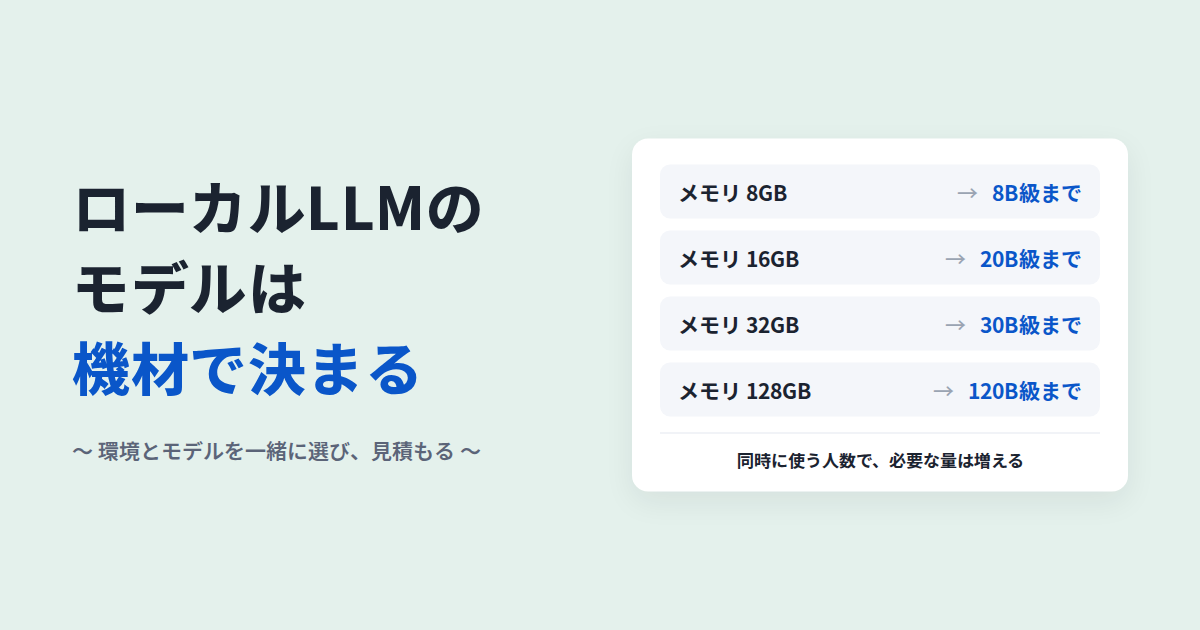
"Which model should we use for our local LLM?" It is one of the questions we hear most often when companies consult us about local LLMs.
The answer depends on your hardware. Models from the same developer can differ in size by a factor of tens or even hundreds. Larger models tend to give better answers, and they use more memory to do it.
This article explains how your hardware's memory decides which models you can run, and lists candidates for each hardware tier. It then shows how to choose the environment and the model together, and how to estimate them as a set.
The content was checked against each company's official pages and model cards on October 14, 2026.
Choosing the Model First Leads to the Wrong Hardware
Models come in versions of different sizes. Alibaba's Qwen3.5, for example, is available in eight sizes, from 0.8B (800 million parameters) to 397B (397 billion parameters)[1].
A model's size translates directly into how much memory it needs. Even when compressed to 4 bits, Google's Gemma 4 uses 2.9 GB of memory for its smallest version, E2B, and 17.5 GB for its largest, 31B[2].
So if you pick a well-reviewed model first, you tend to end up with one of two problems:
- It does not fit on your hardware and will not run, or it runs too slowly to use
- You buy more hardware than you need
Neither the model nor the hardware should be decided first. You choose them as a combination, based on the answer quality your work needs and how it will be used.
Four Factors Decide How Much Memory You Need
To run a local LLM, the model itself and the working data for each conversation must fit in the GPU's memory (VRAM). How much you need depends on four factors.
1. Model Size
A model's size is given as its number of parameters. "27B" means 27 billion. Uncompressed (16-bit), you need roughly 2 GB for every billion parameters[3]. A 27B model needs about 54 GB.
2. How Much the Model Is Compressed (Quantization)
Making a model lighter by storing its numbers with fewer bits is called quantization. In a commonly used 4-bit format, a model fits in roughly 0.6 GB per billion parameters. An 8B model, for example, comes to about 4.9 GB[4].
The more you compress, however, the more answer quality tends to drop. One study found that a 1.7% average drop in Japanese on automatic evaluations corresponded to a 16.0% drop reported by human evaluators[5]. If you work in Japanese, not compressing too far is also an option.
3. How Much Text You Give It at Once
The model keeps the conversation and the documents you give it in working memory (the KV cache) while it answers. The longer the text, the more working memory it uses. With a long document, this can reach about half the size of the model itself[3].
4. How Many People Use It at the Same Time
Working memory is needed for each person using the model at the same time. Hardware that was enough for one person's trial can run short when ten people in a department use it at once.
The amount of working memory also varies greatly with the model's design. That is why you decide how many people will use it at once and how long the texts will be, and then calculate for each model.

Answer Speed Depends on Memory Speed
Even with enough memory, slow answers are no use at work. How fast an LLM generates text is mostly decided by how fast data can be read from memory (memory bandwidth)[6].
Hardware with a similar amount of memory can differ several times over in bandwidth. NVIDIA's compact desktop AI system, for example, offers 273 GB per second, while its workstation GPU offers 1,792 GB per second[7][8]. If you choose hardware on memory size alone, you can end up with something that runs, but slowly.
Which Models Each Hardware Tier Can Run
The table below lists examples of models each memory tier can run, as of October 2026. It assumes 4-bit compression and a single user.
| Memory | Example hardware | Example models | Suited to |
|---|---|---|---|
| About 8GB | PC with an entry-level GPU, Mac with 16GB of memory | Gemma 4 E4B, Qwen3.5-4B, LLM-jp-4.1-8b | Personal trials. Summarizing and drafting short texts |
| 16GB | PC with a mid-range GPU, Mac with 24GB of memory | gpt-oss-20b, Gemma 4 12B, Qwen3.5-9B | Small-group testing. Trying internal document search |
| 24–32GB | High-end consumer GPU, Mac with 36–48GB of memory | Qwen3.8-27B, Gemma 4 31B, Muse Glimmer 30B, LLM-jp-4.1-33b | Department-level testing. Work that needs good Japanese |
| 80–128GB | Workstation GPU, Mac with 128GB of memory, compact AI system | gpt-oss-120b, Mistral Small 4, Qwen3.5-122B-A10B | Department-level production. Running ~30B models without heavy compression |
| Several hundred GB or more | Server with multiple data-center GPUs | DeepSeek V4, Qwen3.5-397B-A17B | Company-wide concurrent use. Large models |
With models around 30B, 24GB of hardware leaves little room for long documents.
Some Macs and AI systems share memory between the CPU and GPU. In that case, most of the installed memory can be used for the model. The Mac figures in the table are higher because not all of it can go to the model.
A PC without a GPU can still run small models on the CPU alone. Answers take a long time, though, so it is not suited to daily work.
Where the Hardware Sits Is Part of the Choice
Where you put the hardware changes the cost and how you get started.
- A PC: easy to try. Not suited to many users
- Servers inside your company (on-premises): suited to cases where internal rules require data to stay on your own equipment. Procuring hardware takes time
- A cloud environment dedicated to your company (private cloud): you can start without buying hardware. Costs depend on usage
You can also test first on private-cloud GPUs and buy hardware only once you know it works.
Once the Hardware Is Set, Narrow Down the Model
Among the models that fit the same hardware, narrow down by three criteria: license, developer and Japanese.
License: Can You Use It Commercially?
Most of the models in this article are released under Apache 2.0 or MIT, so you can use them commercially as long as you follow the terms. Some openly released models, however, come with conditions.
| Model | Main conditions |
|---|---|
| Llama 4 (Meta) | Companies with more than 700 million monthly active users need a license from Meta. "Built with Llama" must be displayed[9] |
| PLaMo open models (Preferred Networks) | Use only inside your company still counts as commercial. Prior registration is required. Companies (including affiliates) with revenue above ¥1 billion in the latest fiscal year need a separate commercial license[10] |
| Mistral Medium 3.5, Devstral 2 | Companies with monthly revenue above $20 million may not use them[11] |
| EXAONE 4.x (LG) | No commercial use[12] |
Models like Swallow, which add Japanese training on top of an overseas model, also inherit the base model's license. Before use, check the license text in force at that time with your legal team. This article is not legal advice.
Developer: Does It Meet Your Internal Rules?
Models from Chinese developers, such as Qwen and DeepSeek, perform well and come in many varieties.
When you run a model on your own hardware, your input is not sent to the developer. The model's tendencies in how it answers remain, however. An evaluation by the U.S. National Institute of Standards and Technology (NIST) reported, among other things, that DeepSeek models tend to give biased accounts on certain topics[13].
If your internal rules or customer requirements ask about the developer's country, you can choose from Gemma 4 (Google), gpt-oss (OpenAI), Muse Glimmer (Meta), Mistral's models, the Japanese LLM-jp-4.1 and others.
Japanese: Does It Answer Correctly in the Language of Your Work?
On the Swallow LLM Leaderboard by the Institute of Science Tokyo, the top open model was Gemma 4 31B. Its Japanese average of 0.675 is close to the cloud AI GPT-5 (0.685)[14]. On W&B's Nejumi LLM Leaderboard 4 as well, Qwen3.8-27B and Gemma 4 31B rank highest among models small enough to run on a single machine[15].
The Japanese-made LLM-jp-4.1 scores below the latest overseas models overall. Its base, LLM-jp-4, was however trained from scratch in Japan, and its training data is public[16][17]. That makes it a model whose contents are easy to explain.
Main Models at a Glance
| Model | Developer | Main sizes | License |
|---|---|---|---|
| Qwen3.8 | Alibaba (China) | 27B | Apache 2.0 |
| Qwen3.5 / 3.6 | Alibaba (China) | 0.8B–397B-A17B | Apache 2.0 |
| Gemma 4 | Google (U.S.) | E2B–31B | Apache 2.0 |
| gpt-oss | OpenAI (U.S.) | 20b, 120b | Apache 2.0 |
| Muse Glimmer | Meta (U.S.) | 30B | Apache 2.0 |
| Mistral Small 4 / Ministral 3 | Mistral AI (France) | 3B–119B | Apache 2.0 |
| LLM-jp-4.1 | National Institute of Informatics (Japan) | 8B, 32B-A3B, 33B | Apache 2.0 |
| ELYZA-Thinking-1.0 (llm-jp-4) | ELYZA (Japan) | 32B-A3B, 33B | Apache 2.0 |
| GPT-OSS Swallow / Qwen3 Swallow | Institute of Science Tokyo, AIST (Japan) | 8B–120B | Apache 2.0 |
| DeepSeek V4 | DeepSeek (China) | 284B and up | MIT |
A name like "35B-A3B" means the model is 35B in total, but only 3B is active for each step (a design called MoE). Because the active part is small, it answers quickly, but the whole model still has to fit in memory. Sources for each model are references [18]–[25].
Before Buying Hardware, Compare on Your Own Questions
Leaderboards help narrow down candidates. Whether a model works for your business, though, only becomes clear when you test it on your own questions.
- Pick one task: searching internal rules, summarizing meeting minutes and so on
- Prepare 20–50 questions: real questions, with correct answers and the source documents
- Set up 2–3 combinations: run the candidate models and hardware under the same conditions
- Have people score the results: look at correctness, sources, natural Japanese and response time
With private-cloud GPUs, you can check the quality and speed of each combination before buying hardware.
A model alone does not know your internal documents. Compare it combined with a system that searches your documents (RAG). The overall setup is explained in What Is a Local LLM?.
Estimate the Environment and the Model Together
What Drives the Cost
The cost of a local LLM varies greatly with the combination of model and environment. When we prepare an estimate, the cost is decided by:
- The models used (size and number)
- The environment (hardware and where it sits)
- How many people use it, and how many at the same time
- The volume and length of the documents it reads
- Integration with existing systems
- Who runs it day to day
Our local LLM implementations generally cost from several million yen to several billion yen. The range is wide because the hardware needed differs by orders of magnitude from one combination to another.
What Helps to Sort Out Before an Estimate
Not everything needs to be decided. Knowing the following helps narrow down the combinations quickly:
- The work you want AI to take on, and the data involved (whether it can leave the company)
- How many people will use it, and how many at the same time
- The types and volume of documents it should read
- Whether internal rules restrict where it runs or who developed the model
- When you want to start
Models Are Replaced Every Few Months
Open models are updated quickly. Qwen released new versions in February, April and August 2026: three in six months[1].
So choose hardware with the next models in mind, not just today's. If you build the system so it does not depend on one model, you can swap in a new model and compare again on the same questions.
Frequently Asked Questions
How much VRAM does a local LLM need?
It depends on the model's size and how much it is compressed. At 4 bits, plan on roughly 0.6 GB per billion parameters. A 27B model needs about 17 GB. On top of that comes memory for the length of the texts you give it and the number of people using it at once.
Which models run on 16GB of VRAM?
gpt-oss-20b, Gemma 4 12B and Qwen3.5-9B, among others. If you give it long documents, working memory grows, so leave some headroom.
Which local LLM model do you recommend?
It depends on your hardware. As of October 2026, with 24–32GB of memory, Qwen3.8-27B and Gemma 4 31B are strong choices. With 16GB, gpt-oss-20b and Gemma 4 12B are candidates. All of them can be used commercially.
Which models are strong in Japanese?
On Japanese leaderboards, Gemma 4 31B and Qwen3.8-27B rank highest among models small enough to run on a single machine. Japanese-made options include LLM-jp-4.1 and models built on it. Test them with the language of your own work.
Can a local LLM run without a GPU?
Small models can run on the CPU alone, but answers take a long time. On Macs and similar machines where the CPU and GPU share memory, you can run fairly large models without a separate GPU.
How much hardware do we need for many people to use it at once?
Beyond the model itself, you need memory for the number of people using it at once and the length of the texts they give it. Working memory also depends on the model's design, so the calculation comes after deciding headcount and usage. For many users, run it with software built for concurrent use, such as vLLM[26].
Can we try it before buying hardware?
Yes. With private-cloud GPUs, you can check the answer quality and speed of each model and hardware combination without buying anything.
How much does a local LLM cost to implement?
With us, generally from several million yen to several billion yen. It varies greatly with the models used, the environment (hardware and where it sits), the number of users and the scope of integration. Estimates are free.
Summary
The models a local LLM can run are decided by your hardware's memory. The memory you need changes with four factors: model size, how much it is compressed, how much text you give it and how many people use it at once.
So rather than deciding either the model or the environment first, choose them as a combination based on your work and usage, and estimate them together.
In the first one to two weeks, we sort out your tasks and settle the model and hardware configuration and the cost outlook (how implementation works). We can also compare combinations on a private cloud before you buy hardware. We run our own business tools this way too, switching between cloud and local for each AI feature (our in-house case study).
If you would like to know which environment and model combination fits and roughly what it would cost, contact us through our free estimate consultation. It is fine if much is still undecided. For details of the service, see Local LLM Build and Implementation Support.
References
- Qwen, "Qwen3.8 (GitHub)"
- Google, "Gemma models overview"
- Hugging Face, "Optimizing LLMs for Speed and Memory"
- llama.cpp, "quantize README"
- K. Marchisio et al., "How Does Quantization Affect Multilingual LLMs?" Findings of EMNLP 2024
- NVIDIA, "Mastering LLM Techniques: Inference Optimization"
- NVIDIA, "DGX Spark"
- NVIDIA, "RTX PRO 6000 Blackwell Workstation Edition"
- Meta, "Llama 4 Community License Agreement"
- Preferred Networks, "PLaMo Community License"
- Mistral AI, "Mistral Medium 3.5 LICENSE", "Devstral-2-123B-Instruct-2512"
- LG AI Research, "EXAONE-4.5-33B"
- NIST, "CAISI Evaluation of DeepSeek AI Models Finds Shortcomings and Risks" September 2025
- Swallow LLM, "Swallow LLM Leaderboard v2"
- Weights & Biases Japan, "Nejumi LLM Leaderboard 4" (checked October 14, 2026)
- Research and Development Center for Large Language Models, National Institute of Informatics, "LLM-jp-4.1"
- LLM-jp, "llm-jp-corpus v4.1"
- Qwen, "Qwen3.8-27B"
- Google, "Gemma 4", "Gemma 4 license"
- OpenAI, "Introducing gpt-oss"
- Meta, "Muse-Glimmer-30B"
- Mistral AI, "Mistral Small 4", "Introducing Mistral 3"
- ELYZA, "ELYZA-Thinking-1.0-llm-jp-4-33b"
- Swallow LLM, "GPT-OSS Swallow", "Qwen3 Swallow"
- DeepSeek, "DeepSeek V4 Preview Release", "DeepSeek-V4-Flash"
- vLLM, "vLLM (GitHub)"